blog

当前位置:首页>文章中心>blog
emmet使用教程「转」
blog 2019-08-30 1 阅读

emmet使用教程「转」

小泥巴 小泥吧科技 2019-08-30
Emmet的前身是大名鼎鼎的Zen coding,如果你从事Web前端开发的话,对该插件一定不会陌生。它使用仿CSS选择器的语法来生成代码,大大提高了HTML/CSS代码编写的速度,而且作为一款插件能够大部分的代码编辑器,文章后面列出了支持的代码编辑器类型。请看下面演示:
Zen coding下的编码演示
一、快速编写HTML代码 1.  初始化 HTML文档需要包含一些固定的标签,比如、、等,现在你只需要1秒钟就可以输入这些标签。比如输入“!”或“html:5”,然后按Tab键:
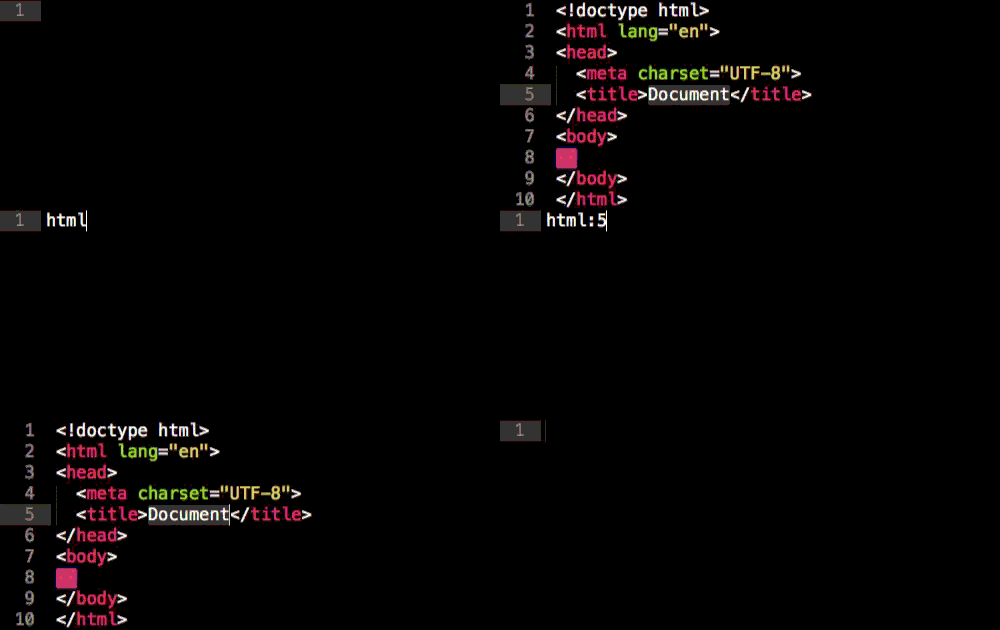
 
  • html:5 或!:用于HTML5文档类型
  • html:xt:用于XHTML过渡文档类型
  • html:4s:用于HTML4严格文档类型
2.  轻松添加类、id、文本和属性 连续输入元素名称和ID,Emmet会自动为你补全,比如输入p#foo:
连续输入类和id,比如p.bar#foo,会自动生成:
Html代码
  1. <class="bar" id="foo">  
下面来看看如何定义HTML元素的内容和属性。你可以通过输入h1{foo}和a[href=#],就可以自动生成如下代码:

Html代码
  1. <h1>foo  
  2. <href="#">  
 
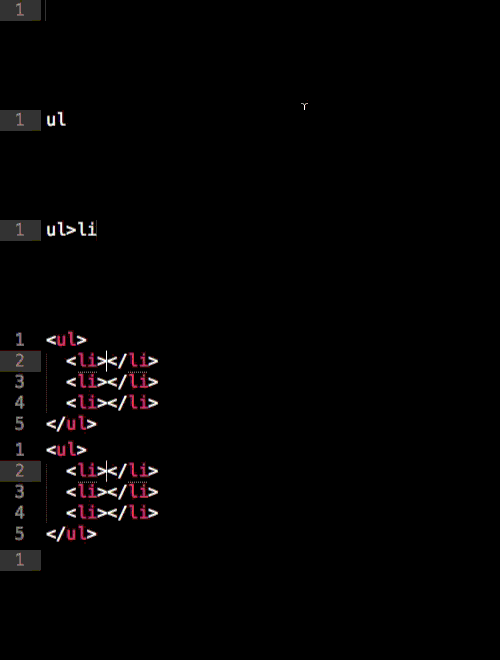
3.  嵌套 现在你只需要1行代码就可以实现标签的嵌套。
  • >:子元素符号,表示嵌套的元素
  • :同级标签符号
  • ^:可以使该符号前的标签提升一行
效果如下图所示:
4.  分组 你可以通过嵌套和括号来快速生成一些代码块,比如输入(.foo>h1) (.bar>h2),会自动生成如下代码:
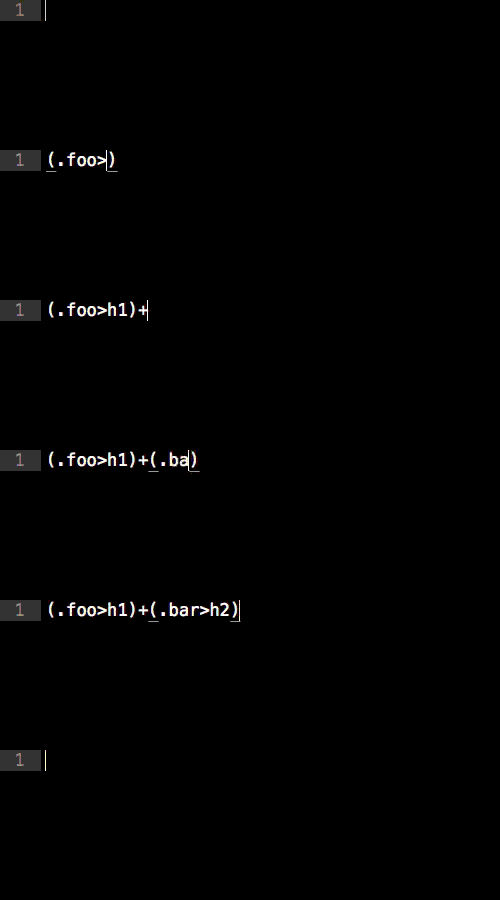
Html代码
  1. <div class="foo">  
  2.   <h1>  
  3. div>  
  4. <div class="bar">  
  5.   <h2>  
  6. div>  
 
5.  隐式标签 声明一个带类的标签,只需输入div.item,就会生成
。 在过去版本中,可以省略掉div,即输入.item即可生成
。现在如果只输入.item,则Emmet会根据父标签进行判定。比如在

    • 中输入.item,就会生成
下面是所有的隐式标签名称:
  • li:用于ul和ol中
  • tr:用于table、tbody、thead和tfoot中
  • td:用于tr中
  • option:用于select和optgroup中
6.  定义多个元素 要定义多个元素,可以使用*符号。比如,ul>li*3可以生成如下代码:
Html代码
  1. <ul>  
  2.   <li>
  3.   <li>
  4.   <li>
  5. ul>  
 
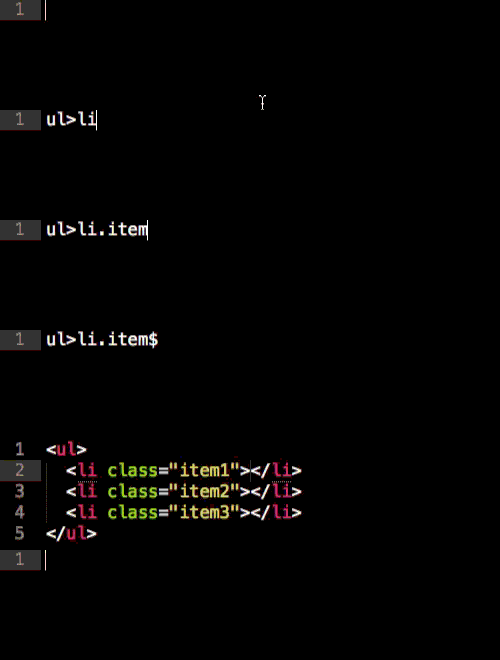
7.  定义多个带属性的元素 如果输入 ul>li.item$*3,将会生成如下代码:
Html代码
  1. <ul>  
  2.   <li class="item1">
  3.   <li class="item2">
  4.   <li class="item3">
  5. ul>  
 
二、CSS缩写 1.  值 比如要定义元素的宽度,只需输入w100,即可生成
Css代码
  1. width: 100px;
 
除了px,也可以生成其他单位,比如输入h10p m5e,结果如下:
Css代码
  1. height: 10%;  
  2. margin: 5em;
单位别名列表:
  • p 表示%
  • e 表示 em
  • x 表示 ex
2.  附加属性 可能你之前已经了解了一些缩写,比如 @f,可以生成:
Css代码
  1. @font-face {
  2.   font-family:;
  3.   src:url();
  4. }
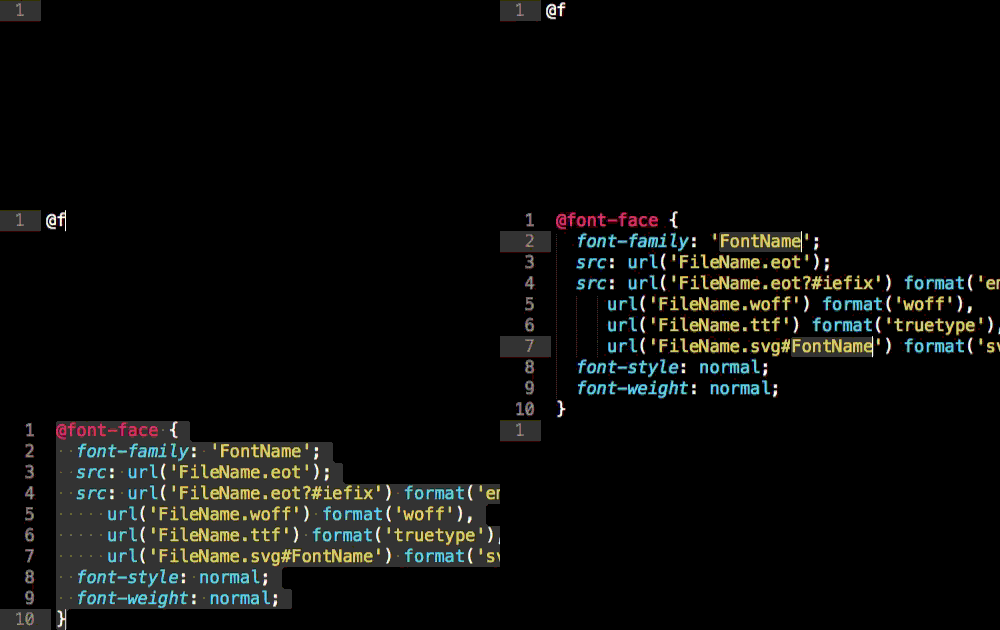
一些其他的属性,比如background-image、border-radius、font、@font-face,text-outline、text-shadow等额外的选项,可以通过“ ”符号来生成,比如输入@f ,将生成:
Css代码
  1. @font-face {
  2.   font-family: 'FontName';  
  3.   src: url('FileName.eot');  
  4.   src: url('FileName.eot?#iefix') format('embedded-opentype'),  
  5.      url('FileName.woff') format('woff'),  
  6.      url('FileName.ttf') format('truetype'),  
  7.      url('FileName.svg#FontName') format('svg');  
  8.   font-style: normal;
  9.   font-weight: normal;
  10. }
 
3.  模糊匹配 如果有些缩写你拿不准,Emmet会根据你的输入内容匹配最接近的语法,比如输入ov:h、ov-h、ovh和oh,生成的代码是相同的:

Css代码
  1. overflow: hidden;
 
4.  供应商前缀 如果输入非W3C标准的CSS属性,Emmet会自动加上供应商前缀,比如输入trs,则会生成:
Css代码
  1. -webkit-transform: ;
  2. -moz-transform: ;
  3. -ms-transform: ;
  4. -o-transform: ;
  5. transform: ;
 
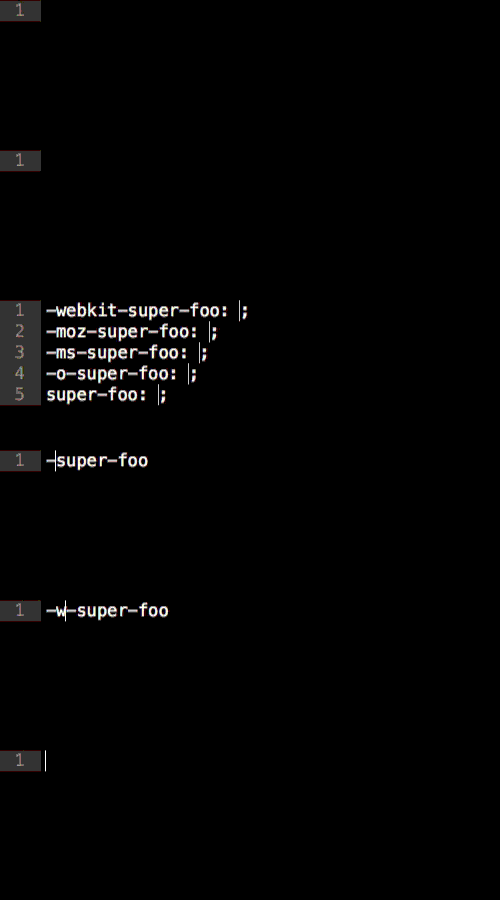
你也可以在任意属性前加上“-”符号,也可以为该属性加上前缀。比如输入-super-foo:
Css代码
  1. -webkit-super-foo: ;
  2. -moz-super-foo: ;
  3. -ms-super-foo: ;
  4. -o-super-foo: ;
  5. super-foo: ;
如果不希望加上所有前缀,可以使用缩写来指定,比如-wm-trf表示只加上-webkit和-moz前缀:
Css代码
  1. -webkit-transform: ;
  2. -moz-transform: ;
  3. transform: ;
前缀缩写如下:
  • w 表示 -webkit-
  • m 表示 -moz-
  • s 表示 -ms-
  • o 表示 -o-
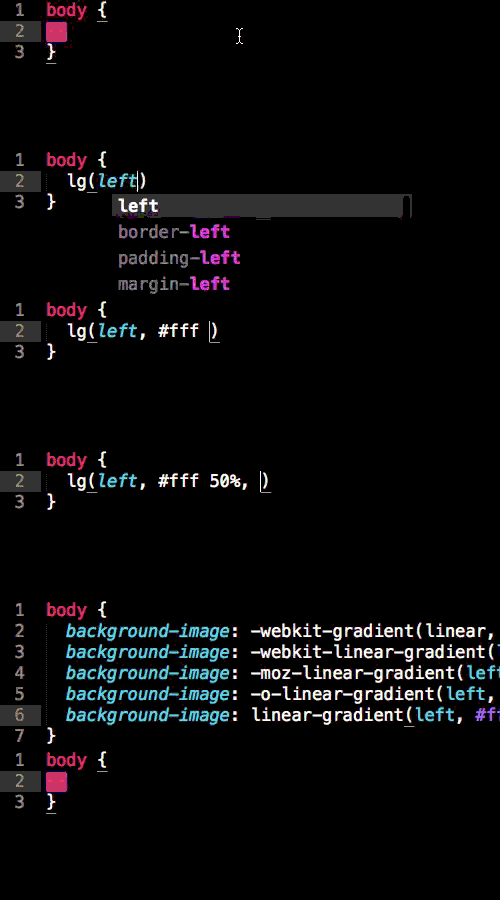
5.  渐变 输入lg(left, #fff 50%, #000),会生成如下代码:
Css代码
  1. background-image: -webkit-gradient(linear, 0 0, 100% 0, color-stop(0.5, #fff), to(#000));  
  2. background-image: -webkit-linear-gradient(left, #fff 50%, #000);  
  3. background-image: -moz-linear-gradient(left, #fff 50%, #000);  
  4. background-image: -o-linear-gradient(left, #fff 50%, #000);  
  5. background-image: linear-gradient(left, #fff 50%, #000);  
 
三、附加功能 生成Lorem ipsum文本 Lorem ipsum指一篇常用于排版设计领域的拉丁文文章,主要目的是测试文章或文字在不同字型、版型下看起来的效果。通过Emmet,你只需输入lorem 或 lipsum即可生成这些文字。还可以指定文字的个数,比如lorem10,将生成:
引用
Lorem ipsum dolor sit amet, consectetur adipisicing elit. Libero delectus.
 
四、定制 你还可以定制Emmet插件:
  • 添加新缩写或更新现有缩写,可修改snippets.json文件
  • 更改Emmet过滤器和操作的行为,可修改preferences.json文件
  • 定义如何生成HTML或XML代码,可修改syntaxProfiles.json文件
五、针对不同编辑器的插件 Emmet支持的编辑器如下(链接为针对该编辑器的Emmet插件):
  • Sublime Text 2
  • TextMate 1.x
  • Eclipse/Aptana
  • Coda 1.6 and 2.x
  • Espresso
  • Chocolat (通过“Install Mixin”对话框添加)
  • Komodo Edit/IDE (通过Tools → Add-ons菜单添加)
  • Notepad
  • PSPad
  • CodeMirror2/3
  • Brackets


语法及标签缩写方法如下:

后代:>

缩写:nav>ul>li

<nav>
    

兄弟:

缩写:div p bq

<div>

上级:^

缩写:div div>p>span em^bq

<div>

缩写:div div>p>span em^^bq

<div>

分组:()

缩写:div>(header>ul>li*2>a) footer>p

<div>
    

缩写:(div>dl>(dt dd)*3) footer>p

<div>
    

乘法:*

缩写:ul>li*5

<ul>
    
  • 自增符号:$

    缩写:ul>li.item$*5

    <ul>
        
  • class="item1">
  • 缩写:h$[title=item$]{Header $}*3

    <h1 title="item1">Header 1
    

    Header 2

    Header 3

    缩写:ul>li.item$$$*5

    <ul>
        
  • class="item001">
  • 缩写:ul>li.item$@-*5

    <ul>
        
  • class="item5">
  • 缩写:ul>li.item$@3*5

    <ul>
        
  • class="item3">
  • ID和类属性

    缩写:#header

    <div id="header">

    缩写:.title

    <div class="title">
    

    缩写:form#search.wide

    <form id="search" class="wide">
    

    缩写:p.class1.class2.class3

    <p class="class1 class2 class3">

    自定义属性

    缩写:p[title="Hello world"]

    <p title="Hello world">

    缩写:td[rowspan=2 colspan=3 title]

    <td rowspan="2" colspan="3" title="">
    

    缩写:[a='value1' b="value2"]

    <div a="value1" b="value2">
    

    文本:{}

    缩写:a{Click me}

    <a href="">Click me
    

    缩写:p>{Click } a{here} { to continue}

    <p>Click href="">here to continue

    隐式标签

    缩写:.class

    <div class="class">
    

    缩写:em>.class

    <em>class="class">
    

    缩写:ul>.class

    <ul>
        
  • class="class">
  • 缩写:table>.row>.col

    <table>
        class="row">


    HTML

    所有未知的缩写都会转换成标签,例如,foo →

    缩写:!

    
    <html lang="en">
    Document


    缩写:a

    <a href="">
    

    缩写:a:link

    <a href="http://">
    

    缩写:a:mail

    <a href="mailto:">
    

    缩写:abbr

    <abbr title="">
    

    缩写:acronym

    <acronym title="">
    

    缩写:base

    <base href="" />
    

    缩写:basefont

    <basefont />
    

    缩写:br

    <br />
    

    缩写:frame

    <frame />
    

    缩写:hr

    <hr />
    

    缩写:bdo

    <bdo dir="">
    

    缩写:bdo:r

    <bdo dir="rtl">
    

    缩写:bdo:l

    <bdo dir="ltr">
    

    缩写:col

    <col />
    

    缩写:link

    <link rel="stylesheet" href="" />
    

    缩写:link:css

    <link rel="stylesheet" href="style.css" />
    

    缩写:link:print

    <link rel="stylesheet" href="print.css" media="print" />
    

    缩写:link:favicon

    <link rel="shortcut icon" type="image/x-icon" href="favicon.ico" />
    

    缩写:link:touch

    <link rel="apple-touch-icon" href="favicon.png" />
    

    缩写:link:rss

    <link rel="alternate" type="application/rss xml" title="RSS" href="rss.xml" />
    

    缩写:link:atom

    <link rel="alternate" type="application/atom xml" title="Atom" href="atom.xml" />
    

    缩写:meta

    <meta />
    

    缩写:meta:utf

    <meta http-equiv="Content-Type" content="text/html;charset=UTF-8" />
    

    缩写:meta:win

    <meta http-equiv="Content-Type" content="text/html;charset=windows-1251" />
    

    缩写:meta:vp

    <meta name="viewport" content="width=device-width, user-scalable=no, initial-scale=1.0, maximum-scale=1.0, minimum-scale=1.0" />
    

    缩写:meta:compat

    <meta http-equiv="X-UA-Compatible" content="IE=7" />
    

    缩写:style

    <style>
    

    缩写:script

    <script>
    

    缩写:script:src

    <script src="">
    

    缩写:img

    <img src="" alt="" />
    

    缩写:iframe

    <iframe src="" frameborder="0">
    

    缩写:embed

    <embed src="" type="" />
    

    缩写:object

    <object data="" type="">
    

    缩写:param

    <param name="" value="" />
    

    缩写:map

    <map name="">
    

    缩写:area

    <area shape="" coords="" href="" alt="" />
    

    缩写:area:d

    <area shape="default" href="" alt="" />
    

    缩写:area:c

    <area shape="circle" coords="" href="" alt="" />
    

    缩写:area:r

    <area shape="rect" coords="" href="" alt="" />
    

    缩写:area:p

    <area shape="poly" coords="" href="" alt="" />
    

    缩写:form

    <form action="">
    

    缩写:form:get

    <form action="" method="get">
    

    缩写:form:post

    <form action="" method="post">
    

    缩写:label

    <label for="">
    

    缩写:input

    <input type="text" />
    

    缩写:inp

    <input type="text" name="" id="" />
    

    缩写:input:hidden

    别名:input[type=hidden name]

    <input type="hidden" name="" />
    

    缩写:input:h

    别名:input:hidden

    <input type="hidden" name="" />
    

    缩写:input:text, input:t

    别名:inp

    <input type="text" name="" id="" />
    

    缩写:input:search

    别名:inp[type=search]

    <input type="search" name="" id="" />
    

    缩写:input:email

    别名:inp[type=email]

    <input type="email" name="" id="" />
    

    缩写:input:url

    别名:inp[type=url]

    <input type="url" name="" id="" />
    

    缩写:input:password

    别名:inp[type=password]

    <input type="password" name="" id="" />
    

    缩写:input:p

    别名:input:password

    <input type="password" name="" id="" />
    

    缩写:input:datetime

    别名:inp[type=datetime]

    <input type="datetime" name="" id="" />
    

    缩写:input:date

    别名:inp[type=date]

    <input type="date" name="" id="" />
    

    缩写:input:datetime-local

    别名:inp[type=datetime-local]

    <input type="datetime-local" name="" id="" />
    

    缩写:input:month

    别名:inp[type=month]

    <input type="month" name="" id="" />
    

    缩写:input:week

    别名:inp[type=week]

    <input type="week" name="" id="" />
    

    缩写:input:time

    别名:inp[type=time]

    <input type="time" name="" id="" />
    

    缩写:input:number

    别名:inp[type=number]

    <input type="number" name="" id="" />
    

    缩写:input:color

    别名:inp[type=color]

    <input type="color" name="" id="" />
    

    缩写:input:checkbox

    别名:inp[type=checkbox]

    <input type="checkbox" name="" id="" />
    

    缩写:input:c

    别名:input:checkbox

    <input type="checkbox" name="" id="" />
    

    缩写:input:radio

    别名:inp[type=radio]

    <input type="radio" name="" id="" />
    

    缩写:input:r

    别名:input:radio

    <input type="radio" name="" id="" />
    

    缩写:input:range

    别名:inp[type=range]

    <input type="range" name="" id="" />
    

    缩写:input:file

    别名:inp[type=file]

    <input type="file" name="" id="" />
    

    缩写:input:f

    别名:input:file

    <input type="file" name="" id="" />
    

    缩写:input:submit

    <input type="submit" value="" />
    

    缩写:input:s

    别名:input:submit

    <input type="submit" value="" />
    

    缩写:input:image

    <input type="image" src="" alt="" />
    

    缩写:input:i

    别名:input:image

    <input type="image" src="" alt="" />
    

    缩写:input:button

    <input type="button" value="" />
    

    缩写:input:b

    别名:input:button

    <input type="button" value="" />
    

    缩写:isindex

    <isindex />
    

    缩写:input:reset

    别名:input:button[type=reset]

    <input type="reset" value="" />
    

    缩写:select

    <select name="" id="">
    

    缩写:option

    <option value="">
    

    缩写:textarea

    <textarea name="" id="" cols="30" rows="10">缩写:menu:context
    
    别名:menu[type=context]>
    
    <menu type="context">
    
    缩写:menu:c 别名:menu:context
    <menu type="context">
    
    缩写:menu:toolbar 别名:menu[type=toolbar]>
    <menu type="toolbar">
    
    缩写:menu:t 别名:menu:toolbar
    <menu type="toolbar">
    
    缩写:video
    <video src="">
    
    缩写:audio
    <audio src="">
    
    缩写:html:xml
    <html xmlns="http://www.w3.org/1999/xhtml">
    
    缩写:keygen
    <keygen />
    
    缩写:command
    <command />
    
    缩写:bq 别名:blockquote
    <blockquote>
    
    缩写:acr 别名:acronym
    <acronym title="">
    
    缩写:fig 别名:figure
    <figure>
    
    缩写:figc 别名:figcaption
    <figcaption>
    
    缩写:ifr 别名:iframe
    <iframe src="" frameborder="0">
    
    缩写:emb 别名:embed
    <embed src="" type="" />
    
    缩写:obj 别名:object
    <object data="" type="">
    
    缩写:src 别名:source
    <source>
    
    缩写:cap 别名:caption
    <caption>
    
    缩写:colg 别名:colgroup
    <colgroup>
    
    缩写:fst, fset 别名:fieldset
    <fieldset>
    
    缩写:btn 别名:button
    <button>
    
    缩写:btn:b 别名:button[type=button]
    <button type="button">
    
    缩写:btn:r 别名:button[type=reset]
    <button type="reset">
    
    缩写:btn:s 别名:button[type=submit]
    <button type="submit">
      转自:https://blog.csdn.net/comphoner/article/details/79670148
    相关标签:

    发表评论:

    评论记录:

    未查询到任何数据!
    QQ咨询
    回电话
    回拨通话

    我们稍后回拨您的电话

    座机请加区号

    微信联系
    微信扫一扫
    微信二维码

    扫码加微信